Home › Epic › Important Changes with Epic

Important Changes with Epic High & Medium Impact

Provider-facing Epic updates. Each change is labeled by how much it affects your day to day work.

13 changes at a glance

High impact first, then Medium. More detail added as it is confirmed.
1 HIGHADVANCE CARE PLANNING Patients can enter their wishes in MyChart Patients can document end-of-life wishes on the End-of-Life Planning page in MyChart. Notes written for the care team display in the Advance Care Planning navigator in Hyperspace. These entries are not legal documents and may differ from advance directives on file. Full details below ↓
2 HIGHBEDSIDE PROCEDURES Bedside procedure lists: one general list, two specialty lists Anesthesia and Emergency have their own bedside procedures preference lists. Every other inpatient specialty uses the General IP Bedside Procedures Preference List. If a procedure you perform is missing from it, request it through OPA and Order Set Requests. Full details below ↓
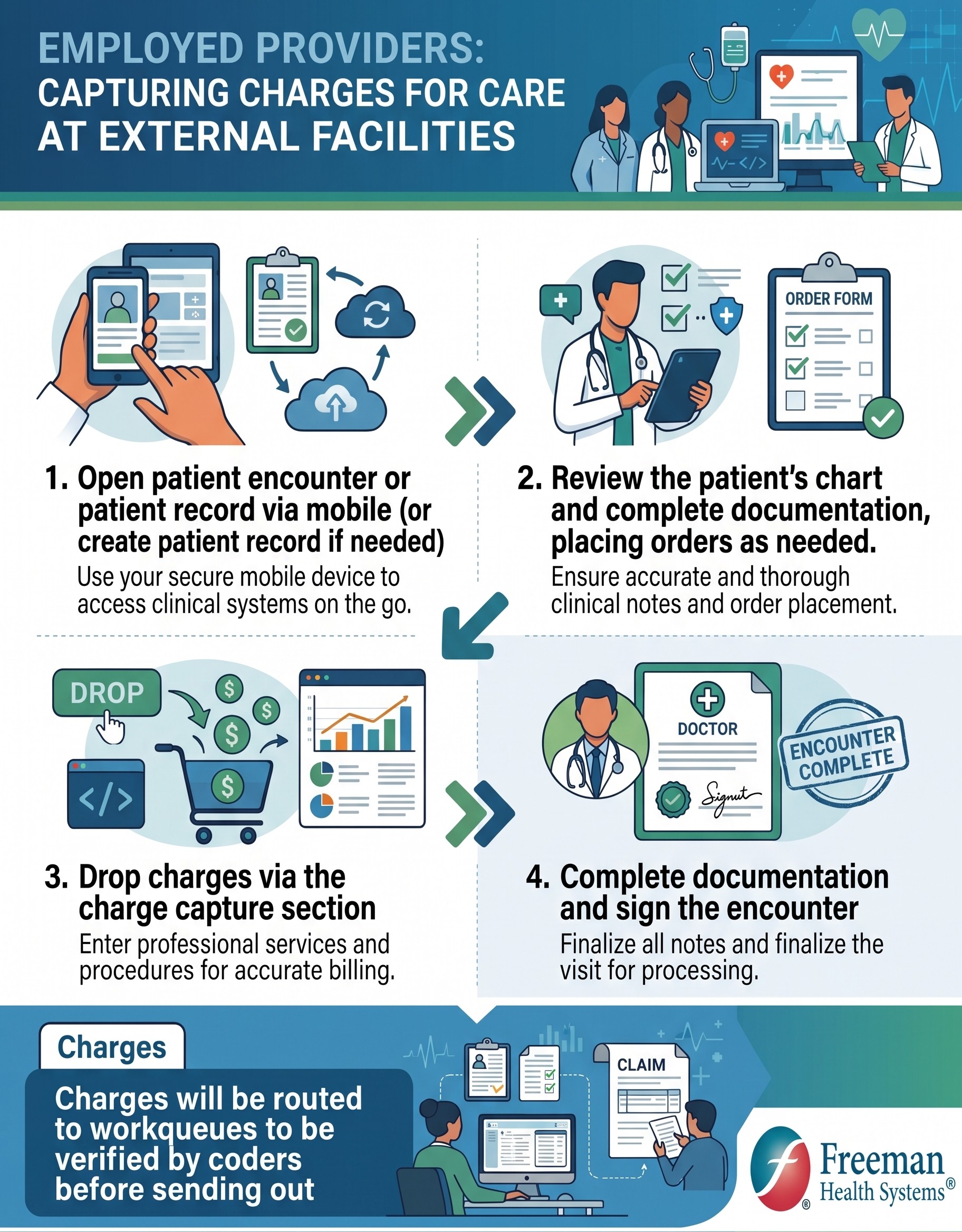
3 HIGHCHARGE CAPTURE Charging for patients seen at outside facilities Employed providers rounding at a facility outside Freeman: open or create the patient record in Haiku or Canto, document and place orders, drop charges in Charge Capture, then sign the encounter. Charges route to coder workqueues before they go out. Full details below ↓
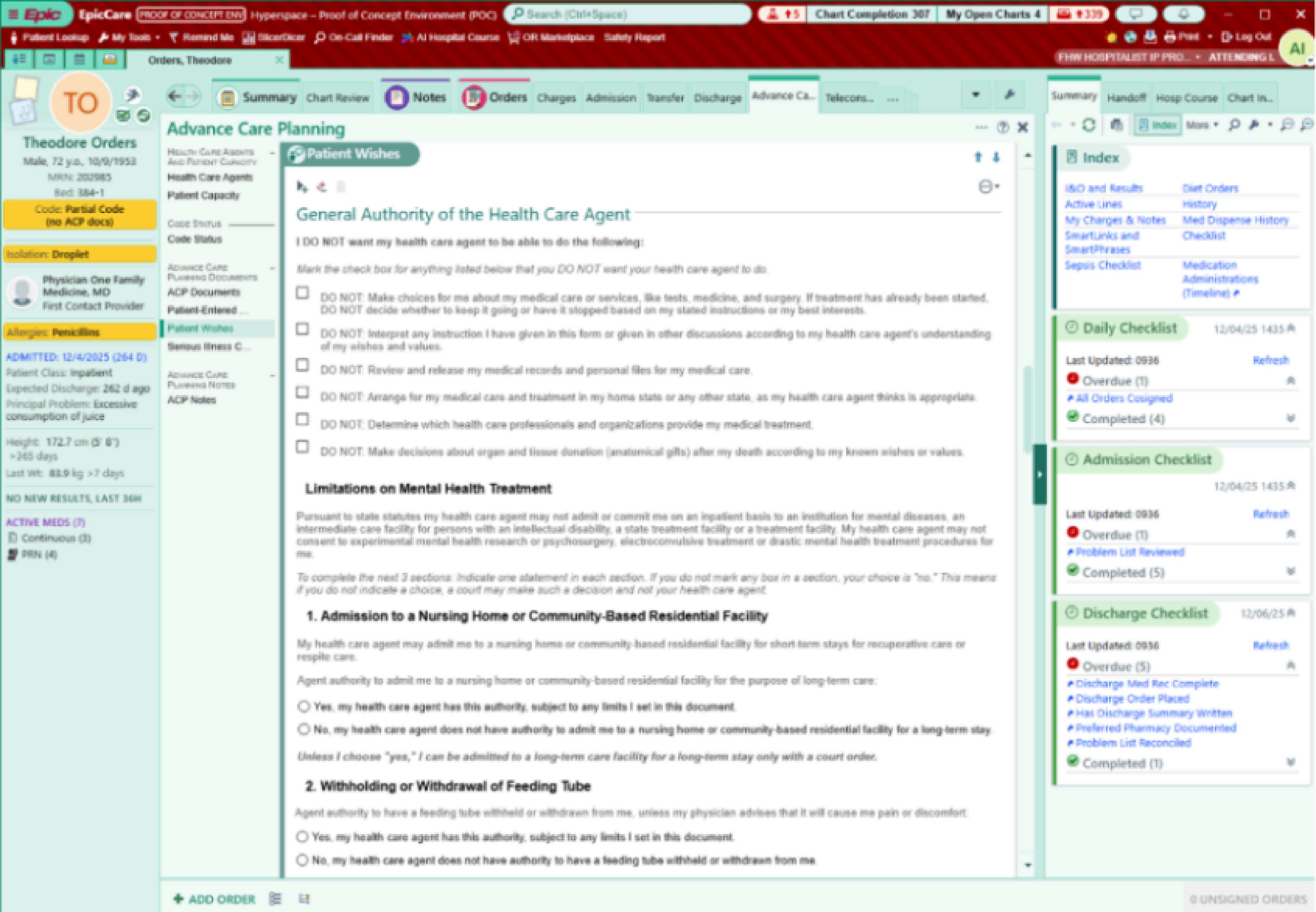
4 MEDIUMADVANCE CARE PLANNING Patient Wishes SmartForm for goals-of-care conversations A SmartForm in the Advance Care Planning navigator lets you discretely document a patient's end-of-life preferences after a goals-of-care discussion. This is separate from what patients enter themselves in MyChart. Full details below ↓
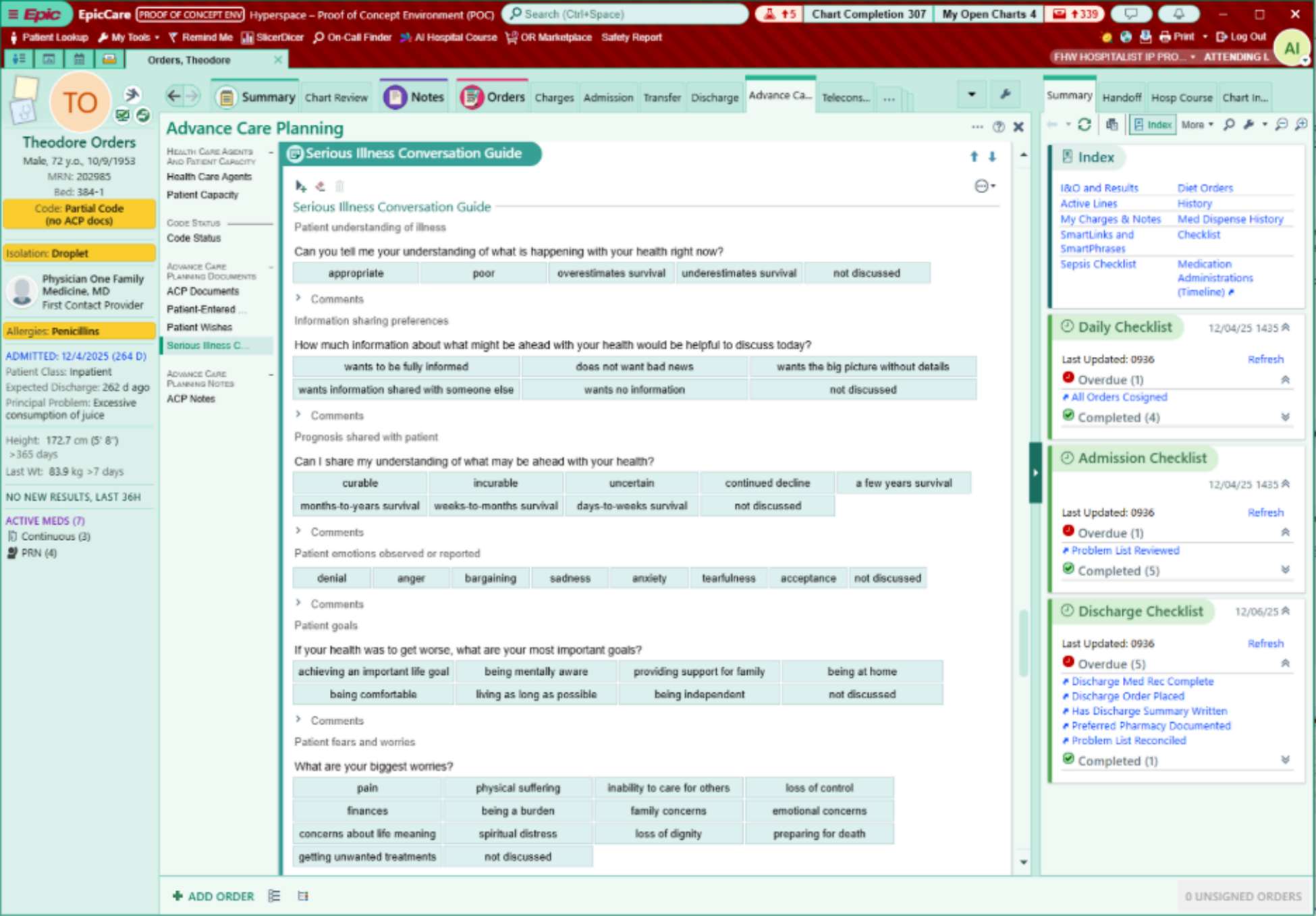
5 MEDIUMADVANCE CARE PLANNING Serious Illness Conversation Guide built into Epic The Ariadne Labs Serious Illness Conversation Guide is available in the Advance Care Planning navigator to support clear, patient-centered discussions about values, goals, and fears when facing serious or life-limiting illness. Full details below ↓
6 MEDIUMBEDSIDE PROCEDURES Procedure charges drop automatically from your note Documenting a bedside procedure in NoteWriter generates the charge automatically, with no manual charge review for covered procedures. Use NoteWriter procedure forms with SmartTexts or dictation and the charge follows your documentation.
7 MEDIUMINPATIENT CONSULTS No gaps allowed in the primary treatment team Every admitted patient must have an attending assigned on the treatment team at all times. Epic will not allow a gap in the primary provider team.
8 MEDIUMOPIOID MANAGEMENT MOSS screening for opioid-induced sedation Nursing will screen inpatients receiving opioids using the Michigan Opioid Safety Score (MOSS), with in-system alerts and care-planning workflows to flag patients at risk of respiratory depression and guide monitoring.
9 MEDIUMORDERS MANAGEMENT Pended orders: who queues, who signs Case management, medical students, nutrition, and similar roles will publicly pend orders for the care team rather than signing them. Watch for pended orders on your patients. They are not active until a privileged provider reviews and signs. Watch the walkthrough ↓
10 MEDIUMDISCHARGE AND TRANSITIONS Discharge orders for LTC and rehab facilities Defines how orders travel with patients discharged to long-term care or rehab, and whether they leave with orders for the receiving facility. Case management confirms the workflow for each facility.
11 MEDIUMRESIDENTS AND STUDENTS Resident and medical student workflows in Epic Residents keep note authorship when you attest or cosign (not when you edit). Students publicly pend orders, which expire after 72 hours. Residents need cosignatures on admission, code status, and discharge orders, and on all notes except progress notes.
13 MEDIUMRESULTS ROUTING Where post-discharge results go Post-discharge results route to the patient's PCP on file, or to a case management pool if there is none. While patients are admitted, new results appear in the New Results patient list column, not your In Basket.

In detail

HIGH IMPACT ADVANCE CARE PLANNING

Patients Can Enter Their Wishes in MyChart

WHAT'S CHANGING

Starting at Epic go-live, patients can document their end-of-life wishes directly in MyChart. On the End-of-Life Planning page (under the My Record menu), patients can record their thoughts for loved ones and for their clinical care team.

WHAT STAYS PRIVATE

Notes patients write "for my loved ones" are personal. They are not visible to the clinical team, only to the patient's designated MyChart proxies.
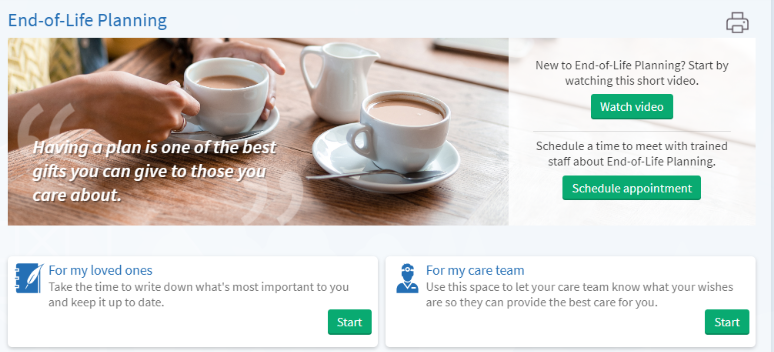
MyChart End-of-Life Planning page
What the patient sees in MyChart: the End-of-Life Planning page, with separate notes for loved ones and the care team.

WHAT YOU'LL SEE IN HYPERSPACE

Patient-entered wishes written "for my care team" display in the Advance Care Planning navigator. Review them in the same place you document your own goals-of-care conversations.

KEY POINTS FOR PROVIDERS

  • Not legal documents. Patient-entered wishes may differ from advance directives on file; always verify against legal documents.
  • Conversation starters, not orders. Use them to open goals-of-care discussions.
  • One place to look. Wishes appear in the Advance Care Planning navigator alongside the Patient Wishes SmartForm and the Serious Illness Conversation Guide.
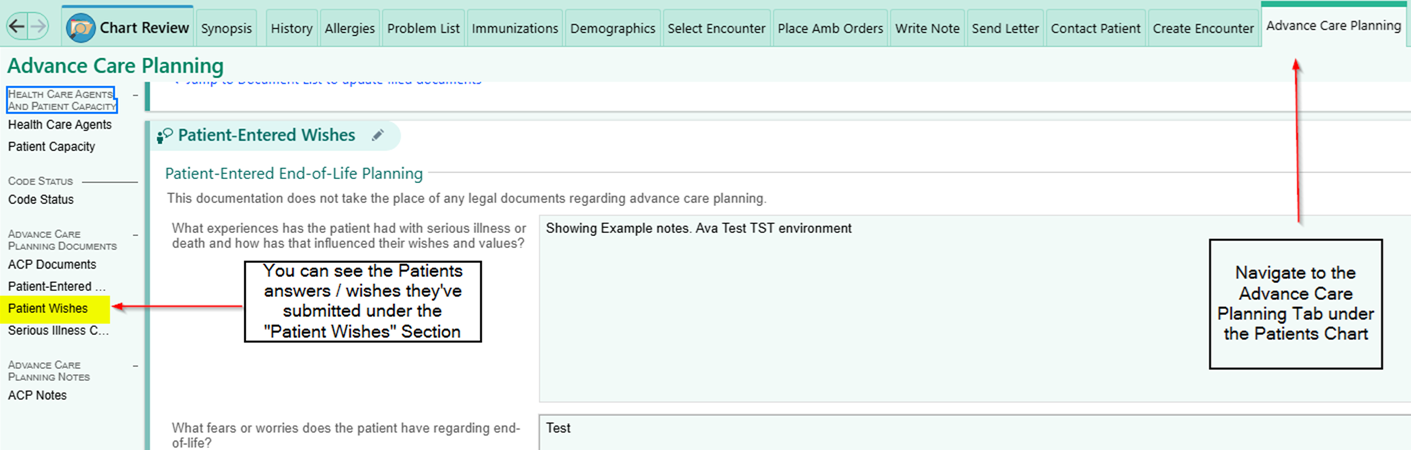
Hyperspace Advance Care Planning navigator
Where it appears for you in Hyperspace: the Patient Wishes section of the Advance Care Planning navigator.

ALSO IN THE ADVANCE CARE PLANNING NAVIGATOR

Upload ACP documents. Open the ACP Documents section, click Jump to Document List, double-click the document type (or search for it), click Import and drag the file from your device into Hyperspace, set Status to Received, then Accept.
Write an ACP note inside your progress note. Open the ACP Notes section, put your cursor where the note goes, type .ACP and pick the SmartPhrase. A blue header shows it is linked to ACP Notes; replace the *** wildcard with your note.

Questions? Contact the Epic Training Team.
Back to the list ↑

HIGH IMPACT BEDSIDE PROCEDURES

Bedside Procedure Lists: One General List, Two Specialty Lists

WHO GETS WHICH LIST

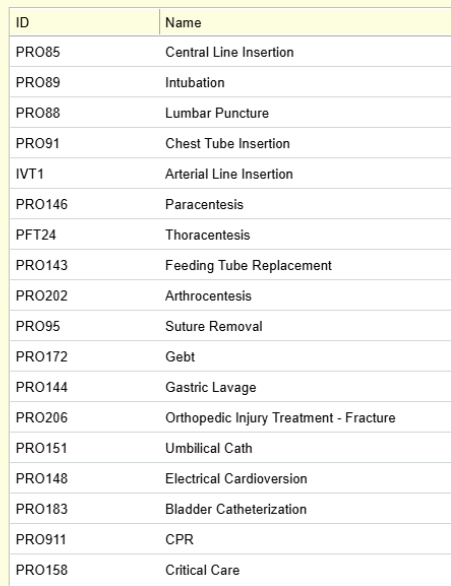
Anesthesia and Emergency have their own bedside procedures preference lists. Every other inpatient specialty uses the General IP Bedside Procedures Preference List. There is no per-specialty list for hospitalists, surgery, critical care, or anyone else.

WHAT IS ON THE GENERAL IP LIST

Central Line Insertion
Intubation
Lumbar Puncture
Chest Tube Insertion
Arterial Line Insertion
Paracentesis
Thoracentesis
Feeding Tube Replacement
Arthrocentesis
Suture Removal
Gebt
Gastric Lavage
Orthopedic Injury Treatment - Fracture
Umbilical Cath
Electrical Cardioversion
Bladder Catheterization
CPR
Critical Care

WHY IT MATTERS

Documenting a bedside procedure from this list in NoteWriter is what drops the charge automatically (see Procedure charges drop automatically from your note). If a procedure you perform is not on the list, it will not be one click at go-live.

Something missing? Request it through an OPA or order set request.

General IP Bedside Procedures Preference List showing 18 procedures
General IP Bedside Procedures Preference List as built. Click to enlarge.

Back to the list ↑

HIGH IMPACT CHARGE CAPTURE

Charging for Patients Seen at Outside Facilities

WHO THIS IS FOR

Employed providers who see patients at facilities that are not on Freeman's Epic. Your charge still has to be captured in Epic, and this is how.

FOUR STEPS, ALL ON YOUR PHONE OR TABLET

  1. Open the patient encounter or record in Haiku or Canto. Create the patient record if it does not exist yet.
  2. Review the chart and complete your documentation, placing orders as needed.
  3. Drop charges in the Charge Capture section. Enter professional services and procedures for accurate billing.
  4. Complete documentation and sign the encounter. Nothing moves until the visit is signed.

WHAT HAPPENS NEXT

Charges route to workqueues where coders verify them before the claim goes out. You do not need to follow up unless a coder reaches out.

Haiku or Canto not connected yet? Start with BYOD and Remote Access.

Employed providers: capturing charges for care at external facilities, four step infographic
Freeman one-pager from the August Lunch & Learn: the same four steps as a printable. Click to enlarge.

Back to the list ↑

MEDIUM IMPACT ADVANCE CARE PLANNING

Patient Wishes SmartForm for Goals-of-Care Conversations

WHAT IT IS

A structured form in the Advance Care Planning navigator that gives clinicians a way to discretely document more detail about a patient's end-of-life preferences: authority of the health care agent, limits on mental health treatment, nursing home admission, feeding tubes, and similar decisions. Use it for any other medical care wishes you discuss and update with the patient. It was built with the Honoring Choices Wisconsin group but is not state-specific.

WHERE TO FIND IT

Open the patient's chart, choose the Advance Care Planning activity tab, then Patient Wishes in the left index.

KEY POINTS

  • Provider-entered, not patient-entered. This is your documentation of the conversation. What patients type in MyChart lands under Patient-Entered, one row up in the same index.
  • Discrete fields. Checkboxes and radio buttons, so the whole care team reads the same answer.
  • Still not a legal document. Advance directives on file remain the legal record.
Hyperspace Advance Care Planning navigator showing the Patient Wishes SmartForm
Patient Wishes SmartForm in the Advance Care Planning navigator (test patient, proof of concept environment). Click to enlarge.

Back to the list ↑

MEDIUM IMPACT ADVANCE CARE PLANNING

Serious Illness Conversation Guide Built into Epic

WHAT IT IS

The Serious Illness Conversation Guide, built into Epic as a click-through form. Developed by Ariadne Labs (a joint center of Brigham and Women's Hospital and the Harvard T.H. Chan School of Public Health), it helps you have compassionate, clear, patient-centered discussions with people facing serious or life-limiting illness, and explore what matters most beyond treatments: values, goals, fears, and care preferences. It walks the conversation in order: the patient's understanding of their illness, how much information they want, prognosis shared, emotions observed, goals, and fears and worries.

WHERE TO FIND IT

Advance Care Planning activity tab, then Serious Illness Conversation Guide in the left index, directly under Patient Wishes.

KEY POINTS

  • One click per answer. Each prompt has preset responses (for example: appropriate, poor, overestimates survival, not discussed) plus a Comments field.
  • Use it with the SmartForm. The guide captures the conversation; the Patient Wishes SmartForm captures the decisions that come out of it.
  • When it helps most. Decisions about future treatments, palliative care, or end-of-life planning.
  • Visible to the whole team. Nursing, palliative care, and consultants see the same guide in the same place.
Hyperspace Advance Care Planning navigator showing the Serious Illness Conversation Guide
Serious Illness Conversation Guide in the Advance Care Planning navigator (test patient, proof of concept environment). Click to enlarge.

Back to the list ↑

MEDIUM IMPACT ORDERS MANAGEMENT

Pended orders: who queues, who signs

WHAT CHANGES

Case management, medical students, nutrition, and similar roles will publicly pend orders for the care team instead of signing them. A pended order sits in the patient's chart, visible to everyone, but it does nothing until a privileged provider reviews and signs it.

WHAT YOU DO

Watch for pended orders on your patients, read what was queued, then sign, edit, or delete. Signing is what makes the order real, so the order is yours once you sign it.

KEY POINTS

  • Public pend, not a personal hold. The whole care team can see it, so anyone privileged to sign can act on it.
  • Nothing happens until you sign. Pharmacy, lab, and nursing do not see a pended order as active.
  • Review it like your own. You are responsible for the order once your name is on it.
Pended orders walkthrough Plays here on this page. Just under 2 minutes.
Pended orders in Hyperspace. Recorded by Joelle, Epic analyst, in a test environment with no patient information. Thanks, Joelle. Video not loading? Open it on YouTube.

Back to the list ↑